Wheel calibration for navigation system
General
The rolling circumference of the wheels is determined and stored by the navigation system during the wheel calibration procedure.
Important!
Wheel calibration must be carried out when one or both front wheels have been changed.
The following faults can occur if a system has not been calibrated or has been calibrated incorrectly.
- Distances to road junctions (intersections) are indicated incorrectly.
- The cursor in the route map is located next to the road currently being driven.
- Turn-off information is given either too early or too late.
Wheel calibration can be carried out following two different methods:
- Wheel calibration by measurement (workshop calibration)
- Wheel calibration by entering (specifying) the tyre size (customer calibration)
As a rule, "calibration by measurement" should be carried out. When implemented correctly, only this method guarantees exact recording of the tyre rolling circumference.
The "specification of tyre size" method assumes the aid of the vehicle owner who, after entering the value, must correct (precision adjustment) it over a longer period of time.
Both methods are described in the following.
Wheel calibration by measurement
Workshop calibration
This method makes it possible to precisely determine the tyre rolling circumference.
The following aids are required for the wheel calibration procedure:
- Special tool 00 9 200 (telescopic rod)
- Special tool 00 9 280 (rod for towing eye)
- Steel tape measure with minimum length of 8 m
- Felt marker with maximum line thickness of 3 mm
Important!
First carry out sensor test and diagnosis for wheel calibration based on a customer complaint.
Preparation
- Check tyre pressure and correct if necessary.
- Drive vehicle on to an even surface, e.g. car park, and align such that it is possible to drive 6 to 8 m straight ahead.
- Apply handbrake.
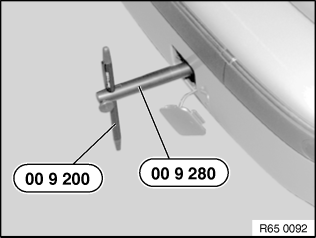
Unclip cover for towing eye at rear. Fit special tool 00 9 280 in the towing eye and fit the telescopic rod 00 9 200 in the hole of the special tool and clamp firmly.
Calibration procedure
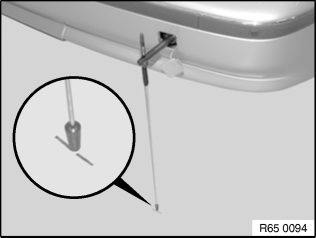
1st step
Lock vehicle in position with handbrake! Extend telescopic rod and mark the starting point on the ground with a felt marker.
2nd step
Switch on ignition in vehicle and select calibration menu on the on-board monitor. The menu is selected as follows:
- Select "Navigation system"
- Select "Information" "location" in the navigation system
- Press the "Menu" button on the on-board monitor for approx. 5 seconds
An information page appears on the on-board monitor and the calibration menu after "continue".
- First select "Select vehicle type" and check that the correct type is indicated. Correct vehicle type if necessary.
The track width shown on the monitor is an average value for all standard tyres which must not be changed. - Confirm vehicle type by pressing "Continue".
- Now select "Wheel sensors" on the monitor. The program branches into the calibration program for wheel calibration.
3rd step
Enter "Start" on the monitor and drive straight ahead for 6 to 8 m at dead slow speed (greater than 1 km/h). Pay attention to the following points:
- The vehicle speed must not drop below 1 km/h to ensure the wheel sensors record the wheel speed.
- Do not apply brakes while driving.
- Do not move steering.
Apply brakes after approx. 6 to 8 m, immediately apply the handbrake and take out of gear. Enter "Stop" on the on-board monitor.
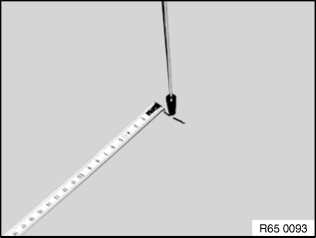
4th step
Mark end point with felt marker and measure the driven distance between the start mark and end mark with a tape measure to an accuracy of 1 cm.
Enter the measured distance on the on-board monitor.
- Caution:A maximum of 800 cm can be entered. On no account must the vehicle be driven back if the driven distance is too long. In this case, the measurement procedure must be terminated and then restarted.
5th step
After entering this distance, a straight ahead distance of approx. 100 m must be driven. Avoid moving the steering!
A note is indicated if the driven distance was too short or if the steering was moved too much.
Wheel calibration is completed after driving this distance and can be concluded with "End calibration".
- Caution: The "back" entry terminates calibration without the new values being adopted!
Important!
Common mistakes in the wheel calibration procedure are:
- The tyre pressure is not checked or corrected prior to calibration
- The start and end points are marked with the naked eye
- The marker used for the start and end marks is too thick or a thick piece of chalk is used
- Measurement distance is too short (below 6 m)
- The measurement distance is covered in jolts in an attempt to reach a defined point.
- The vehicle is not blocked at the beginning and end of the measurement distance with the handbrake and therefore rolls forward or back when exiting or entering the vehicle.
- A folding rule measure which is folded several times is used to measure the driven distance.
- The driven distance is uneven.
- The telescopic rod of the special tool is not in the same vertical position when marking the start and end points.
- The special tool is not fully fitted in the towing eye.
Note!
When braking and driving off, for a short time the vehicle speed is below the minimum speed of approx. 1 km/h necessary for the wheel sensors. The vehicle then covers a distance which is not recorded by the navigation system.
It is therefore absolutely necessary that the measurement distance is covered quickly and without braking.
Print-out of determined values
After calibration, the calculated calibration value (pulses per revolution) can be displayed and printed out on the BMW DIS.
Output takes place via "Service functions" - "Read calibration data of speed sensors (wheel sensors)"
The value does not change while driving the vehicle.
In the event of customer complaints, the print-out can serve the workshop as proof that the customer himself/herself has changed the calibration value.
Wheel calibration by entering the tyre size
Customer calibration
This method offers the technically experienced customer who frequently changes the wheels/tyres himself/herself the option of carrying out the wheel calibration himself/herself.
The rolling circumferences stored in the system for the individual types of tyres, however, are only nominal values which refer to standard specifications.
Additional fine adjustment is necessary due to the fact that, in many cases, the actual rolling circumference of the wheels mounted on the vehicle deviate from these values.
Entering tyre size
The procedure described in the following is only possible with the vehicle stationary.
- Select "Information" "location" in the navigation system Then select "Tyre calibration".
- Select and set the tyre size installed on the vehicle.
A calibration value referred to the specified circumference is now stored in the system.
- The identifier "???" should be selected if the tyre size fitted on the vehicle is not included in the selection stored in the navigation system.
- The nominal rolling circumference can be entered directly in "mm" at the identifier "???". The nominal rolling circumference data must be obtained from the tyre manufacturer.
Fine adjustment is necessary since the actual rolling circumference of the tyre deviates from the nominal rolling circumference.
Fine adjustment
The calibration value can be corrected if the specified metre data deviate continuously when subsequently driving with the navigation system.
- "Fine adjustment" is accessed after entering the tyre size.
- Change and store the indicated correction pointer in small steps corresponding to the deviation.
Once again observe the indicated metre reading with regard to regular deviations.
Note
Due to the fact that the data in the stored map material is not "accurate to the metre" the indicated distance data always deviates to a certain extent from the actual distance. The data must therefore be observed over a longer period of time before and after fine adjustment in order to be able to determine whether the accuracy improved or deteriorated after adjustment.
The calibration data of the workshop calibration are overwritten by the customer calibration.
Please inform the vehicle customer accordingly!