Professional NAV 01 Navigation System Sensor Check
The information is shown on the Control Display (CD).
To activate sensor check:
- Select main menu
- Selection - settings
- Press and hold the "MENU" button longer than 8 sec. in the settings mask
- From ??? menu, select ”Sensor test”
The following shield then appears on the CD:
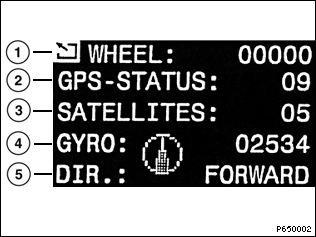
- Wheel speed sensor: number of pulses per minute for left-hand wheel.
- GPS (Global Positioning System) status
- Number of satellites from which signal currently received by GPS receiver
- Direction arrow; voltage supplied by gyro in mV
- Direction of travel forward/reverse
Function check
- From menu, select ”Sensor test”
- Drive several small diameter circles with the vehicle outdoors
- Observe display of sensor check information
Display |
Setpoint |
If not OK, carry out following test |
1 |
While driving (as from approx. 5 km/h): > 0 |
Wheel speed sensor |
2 |
With unobstructed upward field of vision: 11 or 12 |
GPS |
3 |
With unobstructed upward field of vision: > 3 |
GPS |
4 |
Direction arrow clearly moves out of zero position when turning off. When stationary and driving straight ahead: 2500 mV+/400 mV; during turnoff: outside the above specified range. |
If value is not OK: Replace navigation computer. |
5 |
With reverse engaged <BACKWARD> |
Reverse |
Definition GPS status
Display |
GPS status |
Definition |
00 |
No GPS |
GPS inoperable |
01 |
Communication fault |
Navigation computer GPS receiver |
02 |
Reception error |
GPS receiver/antenna |
03 |
No almanac |
The navigation computer has not yet stored any data from satellites. |
04 |
Search conducted for satellites |
GPS searches for satellites |
05 |
1 satellite found |
Positioning via GPS not possible |
06 |
2 satellites found |
Positioning via GPS not possible |
07 |
3 satellites found |
2D positioning possible |
08 |
4 satellites found |
2D or 3D positioning possible |
09 |
5 satellites found |
2D or 3D positioning possible |
10 |
6 satellites found |
2D or 3D positioning possible |
11 |
2D position determined |
Degrees latitude and longitude determined (navigation function possible) |
12 |
3D position determined |
Degrees longitude, latitude and altitude determined (more accurate positioning possible) |
Concerning 03: The GPS receiver collects and stores data from satellites if the following conditions are met:
- Power supply, terminal 30
- Terminal R
- Satellite contact
Note: the data may be lost if the battery or the GPS receiver is disconnected.
In that case, reconnect the battery/GPS receiver and then
- park the vehicle in a position with a clear view of the sky and
- with Terminal R switched on
- and leave for approx. 15 minutes.